How to Build a Kakobuy Multi-Item Order Archive
How to Build a Kakobuy Multi-Item Order Archive
First define the ordering problem a multi-item archive should solve
When you're preparing to handle multiple Kakobuy candidate items at once, the real source of errors is usually not "finding links," but mixing different sources, different specs, and different confirmation statuses together. The result can be duplicate records, missing sizes, wrong quantities, or mistaking unconfirmed information for verified content.
This article is for users who need to organize multiple candidate items, prepare for subsequent ordering, or hand off materials to others for further processing. After reading, you should be able to do three things: create a filterable multi-item archive, clarify what's still missing in each record, and review evidence item by item before submitting.
This does not apply if you only need to temporarily save one item's information, or if you already have a team-confirmed order management system. This article does not treat the article site as Kakobuy's official backend, and does not assume there are table buttons or fields on Kakobuy pages that are not shown by evidence.
The image is used to illustrate how candidate materials can be organized by category, and does not represent Kakobuy's official ordering interface:
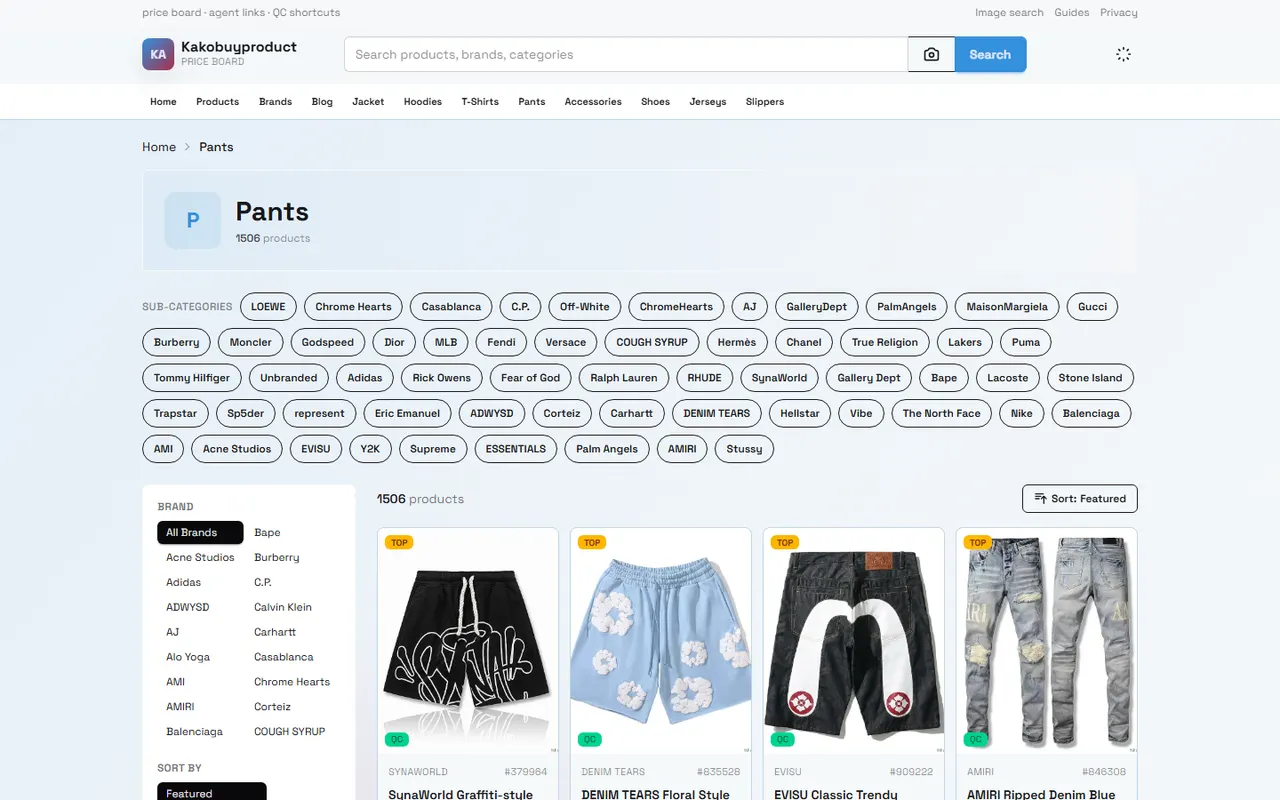
Record source and item identity in Kakobuy Spreadsheet
Start with the principle of one row per candidate item. Do not combine multiple sources in one cell, and do not save only an image while omitting the original source. The purpose of the source field is to allow the next person handling it to go back to the original page to reconfirm, rather than guessing the item's identity from the title.
It's recommended to record the following first:
Source platform or source type
Original item page URL
Original item title
Record creation date
Information status, such as "Pending Verification," "Verified," "Not Adopted"
Person responsible for confirmation or handoff target
Keep special cases that cannot be categorized in the notes
Kakobuy's public item data may be displayed through categories, brand filters, sorting, and item cards. The page in the image shows public information such as categories, item titles, prices, QC, and purchase entry points, but this information cannot replace your item-by-item confirmation of the specific source page. When organizing the archive, save what you actually see, and leave blank the fields you did not see.
Do not judge that an item is ready to order based solely on the item title. The title may lack color, size, version, or seller information, and the source URL may be invalid. When recording, you can separate "page accessible" and "item information sufficiently complete" into two statuses to avoid mistaking an accessible page for completed verification.
Establish unified fields for specs, quantities, and variants
What a multi-item archive needs most is unified field meanings, not table appearance. All records should use the same field order and the same way of filling in, otherwise filtering results will be inaccurate.
You can use the following basic fields:
Field | Key points for filling | Handling when blank |
|---|---|---|
Item title | Keep the name from the source page | Do not add model or brand yourself |
Spec or variant | Record color, size, model, etc. item by item | Write "Pending confirmation" |
Quantity | Fill in quantity separately for each variant | Do not use vague terms like "a few pieces" |
Source URL | Save the corresponding item page | Mark for re-review if page inaccessible |
Spec evidence | Record screenshots, page text, or other reviewable materials | Do not mark as verified without evidence |
Notes | Record special requirements and risks | Do not paste the entire item description repeatedly |
If the same source contains multiple colors or sizes, it's best to split records by variant. This allows you to check each variant separately for confirmation, rather than writing in one row "black and white one each, size pending."
Quantity should also be bound to the variant. For example, for two sizes of the same item, do not write only the total quantity. Later, if you need to modify one size, splitting records reduces the risk of accidentally changing other variants.
For time-sensitive information such as material, stock, seller, shipping, or return/exchange conditions, do not copy directly from old records as current facts. Record the verification date and note whether this information comes from a visible page, customer service confirmation, or other official sources. Fields without evidence support should remain blank or be marked as pending confirmation. 🔎
Separate pending information from verified information
The most dangerous error in an archive is writing "someone mentioned" as "confirmed." You can use two sets of fields that do not get confused: one set for facts, another for actions.
Verified information should answer "What does the page or material actually show?" Pending information should answer "What still needs to be done before ordering?" For example:
Verified: Source page opens and displays the item title.
Pending: Color options have not yet been matched one by one with requirements.
Verified: Page displays public item information.
Pending: Specific quantities and final variants have not been submitted.
Verified: A record retains the original source URL.
Pending: Whether the source page is still valid needs to be rechecked before submission.
Do not use color coding to replace text status. Colors may lose meaning when copied, exported, or viewed on mobile devices. It is recommended to use clear status words, such as "Pending source recheck," "Pending spec confirmation," "Pending quantity confirmation," "Ready for order check."
For content that cannot be confirmed, record the next action instead of guessing the answer. For example, "Confirm size with the orderer" is safer than "Probably size M"; "Reopen the source page" is more accurate than "Should still be in stock." ✅
Use Google Sheets for filtering, notes, and handoff
If you use Google Sheets or another spreadsheet to organize materials, treat it as an external archive tool, not Kakobuy's official backend. It is suitable for filtering, grouping, notes, and handoff, but cannot automatically prove that source pages are still valid, nor replace Kakobuy's actual order confirmation.
It is recommended to set up the following filter views:
Filter all pending confirmation records by status
Filter records that need handoff by person responsible
Filter candidate items under the same source by source
Filter records that cannot be submitted by missing specs
Filter old records that need re-verification by creation date
Notes should be short and specific. A good note lets others know the next step, for example, "Confirm whether black and gray are different variants," "Recheck if the source page is still accessible," "Confirm whether the quantity is one per size." Do not pile chat logs, full page descriptions, and irrelevant screenshots into the notes.
Before handoff, the person responsible should leave the last processing result in the status field. Records that have not completed confirmation cannot be marked as submittable. If multiple people maintain it together, avoid overwriting the same row simultaneously; you can have each person responsible for a clear range of records, and after completion, one person does the final check.
Deduplication boundaries when handling multiple records of the same item
Deduplication is not simply deleting rows with the same title. Identical titles may correspond to different sources, colors, sizes, sellers, or quantity requirements. Only when item identity, source, variant, and purchase intent are all consistent should merging be considered.
You can first compare the following:
Whether the original source URLs are the same
Whether item titles are identical or just similar
Whether specs and variants are consistent
Whether quantity requirements are consistent
Whether there are different pending items
Whether they are handled by different people
If source URLs differ, do not delete one record just because the titles are the same. Keep both records and note in the remarks that comparison is needed. Only when it is confirmed that they represent the same candidate should you keep one master record, while leaving the source and reason for the merged record in the notes.
Also, do not write "same item" as a confirmed fact. A safer approach is to use "suspected duplicate" or "pending comparison" until source, specs, and requirements have all been checked. This avoids mistakenly merging a record missing size information into another complete record. 🧾
How to review archive evidence item by item before ordering
Pre-submission review should be done row by row, not just by looking at total quantities. Each record should at least answer the following questions:
Is the original source still accessible?
Is the item title consistent with the current candidate?
Are specs, color, size, or model clearly defined?
Is the quantity consistent with actual needs?
Which fields still lack evidence?
Is this record a duplicate of another row?
Does the person responsible know the next step?
For Kakobuy's inspection service, public information states that inspection focuses on appearance details such as style, quantity, color, size, and model; some items in sealed packaging or with sealing labels may be inspected without unsealing. The implication here is: the archive should specify all confirmable specs and quantities as much as possible before ordering, and warehouse inspection should not be understood as completing all purchase decisions for you.
Platform fees, international shipping, customs fees, storage periods, and return/exchange conditions may vary by item, route, time, or special category. Knowledge materials show that the total agent fee consists of item cost, international shipping, and possible customs fees; some items also have return/exchange restrictions. Do not treat fees or policies from old archives as current quotes; before submitting, recheck the applicable official materials and order pages.
Regarding account security, do not expose order numbers, passports, payment card numbers, complete waybills, or other unnecessary personal information in the spreadsheet. If you need to share screenshots, first cover personal information unrelated to the task, while retaining item and status content that supports judgment. 🔐
Submission and update actions after organizing
After organizing the archive, first view records with status "Ready for order check" together, then complete the actual submission item by item. Do not use copying an entire column to replace item-by-item confirmation, and do not continue using old titles, old specs, or old notes after the source becomes invalid.
After submission, the archive should be updated to a new status, such as "Submitted pending warehousing," "Need supplementary information," or "Canceled." The update should include processing date, person responsible, and actions that need follow-up. This way, the archive will not mistake submitted records for new candidates in the next organization.
If a record is canceled, keep the cancellation reason, such as invalid source, unconfirmable specs, duplicate record, or not meeting current needs. Unless there is a clear need to delete personal sensitive information, do not delete status records needed for auditing just to make the table look tidy.
The value of a qualified multi-item archive lies not in the number of rows, but in the ability of each row to answer "Where does it come from, what exactly is needed, what is confirmed, and who handles the next step?" Completing this organization may save time on repeated searching, repeated communication, and wrong submissions; the added risk is that maintaining the table itself requires continuous updates, and if old statuses are not rechecked, they may cause errors instead.
This method is suitable for multi-item candidates, multi-person handoffs, and order preparation that requires retaining verification evidence. It is not recommended to build an overly complex table when there is only one simple record, no variant differences, or the team cannot continuously maintain statuses. In that case, keeping a concise and accurate source record is usually more reliable than creating more fields.
Agent platform shopping FAQs
1. Is it safe to use spreadsheet websites on Kakobuy?
Kakobuy's spreadsheet website does not store any user's personal data; it is merely a catalog page displaying item information for the agent platform. All actual transaction processes are completed within Kakobuy's agent platform.
Browse our latest products and find your next favorite item.